 FileFinch
Buy for $19
FileFinch
Buy for $19
Find any file on your Mac the moment you start typing.
FileFinch indexes every file and folder name on your Mac in seconds, then searches millions of them as fast as you type. If you used Everything on Windows, it will feel familiar.
One-time purchase. macOS 13 or later, Apple Silicon and Intel. Notarized by Apple.
This demo searches a handful of made-up files right in your browser. FileFinch does the same across every file on your Mac.
Fast
About 3 million files indexed in under 20 seconds on an Apple Silicon Mac. Searches come back in a few milliseconds.
Always current
FileFinch watches the disk and updates instantly, and it catches up on changes made while it was closed.
Private
Your file list never leaves your Mac. No accounts, no analytics.
Search like a power user
Plain words work. When you need more, the syntax will look familiar if you've used Everything.
*.pdf | Every PDF |
IMG_????.HEIC | Photos named IMG_ plus four characters |
invoice | receipt | Either word |
!tmp | Leave out anything with tmp in the name |
ext:pdf;docx | PDFs and Word files |
size:>100mb | Files over 100 MB |
dm:lastweek | Modified last week |
parent:~/Downloads | Files directly inside Downloads |
Also: path matching, whole words, case-sensitive and regex modes.
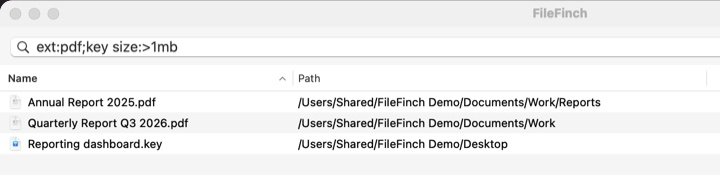
The real app, searching ext:pdf;key size:>1mb
Built for the keyboard
- ⌥SpaceOpen FileFinch from anywhere
- ReturnOpen the selected file
- ⌘RShow it in Finder
- SpacePreview it with Quick Look
A command-line tool is included for scripts and Terminal.
Try it free for 14 days. Keep it for $19.
One payment, no subscription. The trial is the full app, and it needs no credit card.
- macOS 13 Ventura or later
- Apple Silicon or Intel
- Notarized by Apple
Questions
Does FileFinch read my files?
No. It indexes file and folder names only, never what's inside them.
Does it search external drives?
Yes. Choose which drives to index in Options › Volumes.
Why does it ask for Full Disk Access?
macOS hides some folders from apps without it. With it, FileFinch can see every folder. Your file list still never leaves your Mac.
What happens after 14 days?
FileFinch asks for a license key. Buy one, then paste it under FileFinch › License.
How do I get help?
Email FileFinch@kevinagustin.tech.